Why... Why... Why?
This blog is dedicated to documenting error resolution and other tidbits that I discover while working as a Consultant in the Oracle EPM (Hyperion) field. As much of my job revolves around issue resolution, I see an opportunity to supplement the typical troubleshooting avenues such as the Oracle Knowledgebase and Oracle Forums with more pinpointed information about specific errors as they are encountered. Beware, the information found in this blog is for informational purposes only and comes without any warranty or guarantee of accuracy.

EPMVirt: Create your own Oracle Hyperion Virtual Environment:

Showing posts with label Infrastructure. Show all posts

Thursday, December 1, 2016

Keep Your Hyperion Platform Secure by Patching WebLogic

One of the Hyperion Administration tasks often overlooked is the need to patch the underlying components such as WebLogic. If you subscribe to the Oracle security vulnerabilities, you will find frequent critical patch vulnerabilities released.

For instance, the October CPU release link is:
http://www.oracle.com/technetwork/security-advisory/cpuoct2016-2881722.html

Searching for WebLogic will bring up a list of vulnerabilities addressed in this CPU cycle.

If you are curious you can search on the CVE number to get more details.

For instance,
CVE 2015-7501 is part of a bug in apache-commons library bundled inside WebLogic (and JBoss, etc).
https://access.redhat.com/security/vulnerabilities/2059393

Looking back at the CPU article under WebLogic:

Following the link to the Oracle Support Note will require an Oracle Support Login. Once logged in, you can find the suggested patch:
WebLogic Server 10.3.6.0 home PSU 10.3.6.0.161018 Patch 23743997

It is always important to read the README file and all instructions that go along with the patch. Let's take a look at a typical example. Most often the process is twofold:
   1) uninstall any old patches
   2) apply the new patch using the bsu command (in Weblogic 10.3.x)

Some useful snippets from the README:
Oracle WebLogic Server Patch Set Update 10.3.6.0.161018 README
========================================================= This README provides information about how to apply Oracle WebLogic Server
Patch Set Update 10.3.6.0.161018. It also provides information about reverting to
the original version. Released: Oct, 2016 Smart Update Details of Oracle WebLogic Server Patch Set Update 10.3.6.0.161018
-------------------------------------------------------------------------- PATCH_ID - K25M
Patch number - 23743997

Preparing to Install Oracle WebLogic Server Patch Set Update 10.3.6.0.161018
----------------------------------------------------------------------- - WebLogic Server Patch Set Update (PSU) can be applied on a per-domain basis
(or on a more fine-grained basis), Oracle recommends that PSU be applied on an installation-wide basis.
PSU applied to a WebLogic Server installation using this recommended practice
affect all domains and servers sharing that installation.
- Login as same "user" with which the component being patched is installed.
- Stop all WebLogic servers.
- Remove any previously applied WebLogic Server Patch Set Update and associated overlay patches
Installing Oracle WebLogic Server Patch Set Update 10.3.6.0.161018------------------------------------------------------------- - unzip p23743997_1036_Generic.zip to {MW_HOME}/utils/bsu/cache_dir or any local directory Note: You must make sure that the target directory for unzip has required write and executable permissions for "user" with which the component being patched is installed. - Navigate to the {MW_HOME}/utils/bsu directory. - Execute bsu.sh -install -patch_download_dir={MW_HOME}/utils/bsu/cache_dir -patchlist={PATCH_ID} -prod_dir={MW_HOME}/{WL_HOME} Where, WL_HOME is the path of the WebLogic home Reference: BSU Command line interface http://docs.oracle.com/cd/E14759_01/doc.32/e14143/commands.htm To verify the installed patch: b) The following command is a simple way to determine the application of WebLogic Server PSU. $ . $WL_HOME/server/bin/setWLSEnv.sh $ java weblogic.version In the following example output, 10.3.6.0.161018 is the installed WebLogic Server PSU. WebLogic Server 10.3.6.0.161018 PSU Patch for BUG23743997

Translating this into actual commands:
cd Oracle\Middleware\utils\bsu\
bsu.cmd -remove -prod_dir=Oracle\Middleware\wlserver_10.3 -patchlist=UIAL
Checking for conflicts....
No conflict(s) detected
Removing Patch ID: UIAL..
Result: Success
bsu.cmd -install -prod_dir=\Oracle\Middleware\wlserver_10.3 -patch_download_dir=\Oracle\Mid
dleware\utils\bsu\cache_dir -patchlist=K25M

Checking for conflicts....
No conflict(s) detected
Installing Patch ID: K25M..
Result: Success
Testing the patch...
Oracle\Middleware\wlserver_10.3\server\bin\setWLSEnv.cmd

CLASSPATH=....
PATH=...
Your environment has been set.
 >java weblogic.version
WebLogic Server 10.3.6.0.161018 PSU Patch for BUG23743997 TUE AUG 30 18:34:42 IST 2016
WebLogic Server 10.3.6.0  Tue Nov 15 08:52:36 PST 2011 1441050
Use 'weblogic.version -verbose' to get subsystem information
Use 'weblogic.utils.Versions' to get version information for all modules
Success! The 10.3.6.0.161018 version matches that of the README.

Friday, August 19, 2016

Mistakenly Forgot Admin Credentials While Enabling SSO

Recently I made a dumb mistake. I was trying to enable single sign on (SSO) and hastily set everything up and restarted all services. However, once SSO was enabled I realized that I had not prior to enabling set my SSO user account with admin access in Hyperion. Since SSO was enabled, the admin user was no longer available to use for login because the SSO user is now enforced. With SSO enabled, the 'admin' user becomes obsolete.

In the past versions like 11.1.2.2 this was no big deal as you could always login with your username and password using /interop to login directly to Shared Services. However, in 11.1.2.4 you have to go through Workspace to get to Shared Services, enforcing the SSO login. Without admin privileges on your user account you cannot disable SSO, or make any setting changes at all! I had essentially locked myself and everyone else out of the system.

To restore the system I remembered a setting in Workspace, "Allow Direct Login After SSO Failure". This is a good fallback setting if SSO fails, giving you a way to access Hyperion using the old username/password combo. This would have been ideal to set BEFORE I locked myself out... At this point I can't make any changes to the system due to lack of administrator privileges.


From the help pages in Workspace:


However, I recall that using epmsys_registry we can make changes to the EPM system registry without any credentials. Perhaps it's possible to change this setting. Looking in the epm registry report, it looks as if the field is available in WORKSPACE_LWA.


Using the object id, you can view and change the setting...
/export/u1/app/Oracle/Middleware/user_projects/epmsystem1/bin/epmsys_registry.sh view \#18349408fd0bc34c317d176d1562f332264S7f57

/export/u1/app/Oracle/Middleware/user_projects/epmsystem1/bin/epmsys_registry.sh updateproperty \#18349408fd0bc34c317d176d1562f332264S7f57/@AllowDirectLogonAfterSSO true

(note the object id differs between the screenshot and commands because I took the screenshot from a different system. They should be the same in practice.)

Once I restarted the system this property was in place. However, the ability to login using the username/password combo only appears if SSO fails. There was nothing inherently wrong with SSO, it was working just fine. I had to make SSO fail in order to login. This seemed pretty easy, I just accessed Workspace directly rather than going through the SSO enabled web server. Consequently, the SSO token was not passed and the login prompt appeared. Finally... I was able to login as admin and provision my user id with admin privileges to gain access!

One might argue that the option to allow direct login if SSO fails should always be set. In my opinion, it is way too easy for malicious users to trick the SSO into failing and then gain access to the direct login prompt. This seems to be a security risk. I think using the method presented above,makes it possible to turn it on and off on demand if you need to get a backdoor into the system without it being enabled all the time.


Saturday, July 16, 2016

Running Weblogic Admin Server as a Windows Service

The WebLogic Admin server can be a useful tool in the EPM environment. However, it does not come installed as a Windows service and consequently is not always running. In order to tap into the powerful features in Enterprise Manager or WebLogic admin server you first need to get it up and running as a Windows Service.

The following is a quick script that can help. Create a Windows .bat file called installWLService.bat
Change USERDOMAIN_HOME and WL_HOME to reflect your environment.

SETLOCAL
set DOMAIN_NAME=EPMSystem
set USERDOMAIN_HOME=D:\Oracle\Middleware\user_projects\domains\EPMSystem
set SERVER_NAME=AdminServer
set WL_HOME=D:\Oracle\Middleware\wlserver_10.3
set PRODUCTION_MODE=true
set MEM_ARGS=-Xms512m –Xmx512m
call "%WL_HOME%\server\bin\installSvc.cmd"
ENDLOCAL

This should install a new Windows service:

beasvc EPMSystem_AdminServer

Quickly Search Logs Using Weblogic Enterprise Manager

One of the most powerful ways to triage issues is the search feature in Weblogic's Enterprise Manager. The search allows one to search through the log files associated with all managed servers in the domain. Said a different way, it searches all Weblogic logs at once without even needing to login to a server. So if you have a 10 server footprint you would not have to log into 10 different servers to view the logs. 

There are many benefits to the search feature:
  • View all lines from the last hour
  • View only messages with criticality set to ERROR so you're not searching through lots of info and debug information
  • Web-based interface no need to log into individual servers
One caveat to remember is the search only covers Weblogic logs. There are many other logs in Hyperion that this will not hit. However, it takes about 2 minutes to check, and usually the front end can give you a very good idea of what the error is. It's a great place to start troubleshooting.


To get started, start up the WebLogic admin server:
Oracle/Middleware/user_projects/domains/EPMSystem/bin/startWebLogic.sh

To access Enterprise Manager use the same url you would use to get to the admin server, but replace /console with /em

for instance:  http://server:7001/em

Once logged in,
WebLogic Domain -> EPMSystem -> Logs

Here you can see the powerful search interface. In this case we are searching 46 log files within the last hour for Errors. 


A detailed view of the results here show clearly Shared Services is failing due to a locked database account.


To sum up, it took about 60 seconds to login to EM and open the log interface to find this error. This can be a pretty powerful first place to start when troubleshooting issues. 

For this to be most useful, you should run the Weblogic admin server as a service so it is always available to login and look at logs. In Unix this is just a matter of starting the process. In Windows, you might want this quick tip to install the Admin Server as a Windows service:
http://epm-errors.blogspot.com/2016/07/running-weblogic-admin-server-as.html


Wednesday, May 18, 2016

Error in 11.1.2.4 ConfigTool: TNS-04612: Null RHS


I recently came across this error in the config tool while trying to reconfigure the database connections.

 [EPMCFG] [ERROR] [EPMCFG-01020] [oracle.EPMCFG] [tid: 30] [ecid: 0000LJ5CfaK8dplqwsZf6G1NFBXo00000E,0] [SRC_CLASS: com.hyperion.config.wizard.impl.RunAllTasks] Error: [[
java.io.IOException: TNS-04612: Null RHS for "my_tns"
at com.hyperion.cis.config.TNSParser.writeTnsOraFileEntry(TNSParser.java:189)
at com.hyperion.cis.config.AbstractProductDBConfigurator.updateDatabaseConnectionConfigurationFiles(AbstractProductDBConfigurator.java:854)
at com.hyperion.config.wizard.impl.RunAllTasks.executeDbConfigTask(RunAllTasks.java:681)
at com.hyperion.config.wizard.impl.RunAllTasks.execute(RunAllTasks.java:306)
at com.hyperion.config.wizard.impl.RunnAllTasksState.run(RunnAllTasksState.java:92)
at java.lang.Thread.run(Thread.java:662)

]]

What is happening is the config tool is trying to parse the tnsnames.ora under the bundled Oracle client, Oracle\Middleware\user_projects\config\dbclient and failing. I added some additional TNS entries for connecting to external databases to this tnsnames file. The config tool was trying to parse these additional entries and crashing. In order to successfully complete the config tool, I had to rename the existing tnsnames.ora to tnsnames.ora.bak and then run the config tool. This creates a brand new tnsnames.ora file. After successful configuration it was necessary to merge the changed TNS descriptors for "HFMTNS" and "BPMA_ALIAS" from the new tnsnames.ora into the .bak file. Finally, revert tnsnames.ora.bak file to its original name, tnsnames.ora.


Monday, November 30, 2015

Time to Upgrade EPM?

It might be time for an upgrade for slightly older EPM releases. Below is the timeline for backwards support for fixes on the EPM platform. To sum up the table, the 11.1.2.1 and 11.1.2.2 versions are already sunsetted for patches. Additionally, the 11.1.2.3 version will no longer be supporting new patches and fixes as of February 2016. Given that typically not much work is completed near the end of year, it may come as a surprise in February. It is also possible that Oracle releases a patch greater than .700 which may extend the window for 11.1.2.3. At the very least, the table indicates that it is necessary to move rather quickly and frequently on the patch releases to keep up to date.

Oracle's official statement is:
PLEASE NOTE: When the grace period end date has been reached, no additional fixes will be developed.  The grace period is defined as the period of time following the release of a new patch set or patch set update during which Oracle will create new fixes for both the new and previous patch set or patch set update, allowing customers time to plan for and install the new version. 
Oracle Enterprise Performance Management 11g Grace Periods for Error Correction (Doc ID 1590676.1)

Note: The info is subject to change.


Wednesday, October 28, 2015

Open World Update - Oracle 12c High Availability


Quick OOW update on the Database track...

Today I attended the interesting session at Oracle Open World 2015:
Deep-Dive into High Availability with the Next Release of Oracle Database 12c [CON8827].
By Wei Ming Hu, Vice President - High Availability Technologies, Oracle

New Database 12.2 Updates

Oracle is shifting to the concept of Elastic Sharding, referencing many times in the talk about Google's sharded infrastructure for large scaling. This is essentially multiple independent nodes acting as a single logical database. These nodes do not require any shared storage or expensive clustering infrastructure. This is almost the exact opposite of RAC which requires intensive shared storage and networking requirements.

It appears this is Oracle's solution to moving into the cloud. In the cloud expensive clusterware technologies are not appropriate.

What is the underlying technology to Elastic Sharding? Active Data Guard. Oracle is beefing up the Active Data Guard technology to run the internals.
- Changes from logical sql level to block level replication.
- Redo logs will be applied to standby nearly instantly.
- Preserve all sessions during failover - allowing for online patching...etc.
- Allows for In Memory database.
- Seamlessly detect failures and evict nodes for repair.

While I am sure there always use cases, my opinion is RAC is going to be less important going forward.


Sunday, September 20, 2015

SHA2 SSL Certificates are Coming

A relatively low key change is being embraced quickly by the security industry and it may impact Oracle Hyperion installations. When using SSL certificates there is a specific encryption algorithm used to sign the certificates. This algorithm for a long time was SHA1. However, SHA1 is an old technology and can now be cracked easily. It is no longer secure to use SHA1. Consequently, the industry is swiftly moving to SHA2. As of Jan 1st, 2016 no SHA1 certificates can be issued, forcing the change to SHA2.

One of the better writeups I found on the issue is:
http://www.infoworld.com/article/2879073/security/all-you-need-to-know-about-the-move-to-sha-2-encryption.html

What does this mean?
Some older software has trouble with the SSL handshake using SHA2. For instance with Oracle Database, SHA2 was only supported starting with 11.2.0.3.
http://docs.oracle.com/cd/E11882_01/server.112/e41360/chapter1_11203.htm
Since then some products have been back ported to support SHA2, but likely require patches. The SHA2 change mostly impacts integrating with older systems using SSL. However, anything touching SSL can be impacted. It will be necessary to identify and test any integration points in your environment with SSL. A few examples include:

  • WebLogic
  • LDAP providers
  • Single Sign On providers
  • SSL database connections (DRM, FDM, Essbase...etc)
  • SOA / Web Services interactions
Don't panic. Most Hyperion sites do not make heavy use of SSL. Perhaps just offloading at the Load Balancer. However, sites that have integrated SSL more thoroughly in the environment may be impacted.


Browsers are already starting to call out insecure sites. For instance taking a look at Wells Fargo in Chrome, points out the connection to www.wellsfargo.com is using an obsolete cipher suite.

Taking a look at the certificate details:

However, most sites have already converted. The google.com cert shows the SHA2 certificate.


Your company will be upgrading soon, if not already. Consequently, it's time to start testing your SSL connections with SHA2 to make the transition smoothly.

Saturday, August 22, 2015

SSL Tip: Converting a JKS file into an Oracle Wallet


When implementing SSL with Oracle technologies such as OHS an Oracle Wallet is required. The Oracle Wallet is Oracle's proprietary keystore for holding identity and trust SSL keys. Often though, a company will provide the Java Keystore (jks) format. Here is a trick to convert the JKS into an Oracle Wallet via the command line using the orapki command from an Oracle Client installation.

# create a new wallet. If C:\wallet_temp already exists, remove it first.
orapki wallet create -wallet c:\wallet_temp -auto_login_local
orapki wallet create -wallet c:\wallet_temp\ewallet.p12 -auto_login

# Remove all the default trusts from new wallet for a truly empty wallet
orapki wallet remove -wallet c:\wallet_temp\ewallet.p12 -trusted_cert_all

# using an existing jks file, import all contents into the new wallet
orapki wallet jks_to_pkcs12 -wallet c:\wallet_temp\ewallet.p12 -keystore c:\wallet_temp\my_java_keystore.jks -jkspwd "my_java_keystore_password"

At this point the new wallet is stored in C:\wallet_temp and ready to use.

Thursday, July 16, 2015

Oracle Learning Library - Hidden Gems

The Oracle Learning Library has a myriad of tutorials on Hyperion and related technologies. They are often overlooked as the interface is filled with out of date and somewhat scrawny material. However, there are some hidden gems. Much of the material in the tutorials goes beyond the basics found in the Oracle Documentation, and they can shed light on some of the more poorly documented topics.
First, it can be a great way to explore the technology stack. For instance, getting some intro tutorials on WebLogic, Linux, and Oracle RDBMS.

Some of the Hyperion articles are in depth and cover a lot. They are rich with screenshots.

The main Oracle Learning Library site for Hyperion is:
https://apexapps.oracle.com/pls/apex/f?p=44785:2:::NO:2,RIR,CIR:P2_TAGS:Hyperion

Basic install instructions detailing how to scale to multiple nodes.
Installing and Configuring Oracle® Hyperion Financial Close Management 11.1.2.4.000 in a Multi-Node Environment 
http://www.oracle.com/webfolder/technetwork/tutorials/obe/hyp/FCM11.1.2.4-MultiNodeInstall/FCMMultiNodeInstall.html

Basic knowledge for training new recruits.
Intro to Financial Management 
http://download.oracle.com/technology/products/hfm/demos/hfm1112overview/HFM_LessonIndex.htm

One of my favorites...
Deploying and Configuring Data Relationship Management Web Service API 
http://www.oracle.com/webfolder/technetwork/tutorials/obe/hyp/DRM11.1.2-WebServicesAPI/index.htm

Oh, is that how you're supposed to do it?
Installing and Configuring EPM System 11.1.2 with SSL Enabled on All Layers 
http://www.oracle.com/technetwork/middleware/performance-management/tutorials/index-087654.html

Getting up to speed on those pesky task flows...
Automating Tasks in Oracle® Hyperion Financial Management, Fusion Edition 11.1.2 
http://www.oracle.com/webfolder/technetwork/tutorials/obe/hyp/HFM11.1.2_TskAuto/Tsk_Auto.htm

Sunday, June 21, 2015

Hyperion Auditing - In Practice vs. Theory

At first glance the Shared Services audit features in Hyperion seem complete. However, in practice, the user interface seems to be clunky and hard to use.

The audit features are found in Shared Services. First, auditing has to be enabled in order to capture any auditing information. This can be accomplished by entering Shared Services and selecting Administration -> configure auditing. Select "Enable Auditing". Most of the auditing for the various products are simply LCM. In other words, you will see only LCM operations being audited. However, under Shared Services there is a little more detail:

The option that is most interesting is User Provisioning. Many organizations require fine grained auditing of users as they are provisioned and deprovisioned from applications. This can aid in meeting specific SOX requirements. Let's take a closer look at this in practice.

First, let's look at the Shared Services Auditing user interface. This is found in Administration -> Audit Reports -> Security Reports.

The default report shows 30 days of history. It can be confined to a specific date range too. You can search by "performed by". However, if you are unsure who performed the action, this field may not be very useful. Finally, you can narrow down by product name. In this case the product is Shared Services for checking provisioning information.


One of the first challenges becomes sifting through the interface. It is impossible to sort or narrow
down by Task, which is the operation being audited. Consequently, the display is overwhelmed with "authenticate" requests from users using the system. Secondly, only 50 items can be displayed on the page at a time. Let's say you want to review audit information over a range of 10 days. Now the pagination ("1of x") comes into play. One has to sort though multiple pages of info, most of which is irrelevant authentication information. What about finding when a user was provisioned over the last year? Forget about it.

Assuming you do find a particular item of interest. In this case, the admin user provisioned "testuser1" to an application. Notice anything missing? What application? For this information you have to click the checkmark in the options for "Detailed View".


The detailed view shows the full detail. This now tells us that testuser1 was provisioned by admin to the PLANDEMO application as role Administrator.


This display is perfectly fine, but it is difficult to search around repeatedly for looking for specific information.

One way to get at the data is to tear off the clunky user interface and head to the database, targeting exactly the info you want. A rough, basic query can be put together quickly. From there it is possible to do much more powerful querying. Additionally, the audit information accumulates very quickly. Keeping this data around can grow to huge sums of data. Using a query over the user interface can help sift through millions of rows quickly.

select STARTTIME, USER_NAME, ARTIFACT_NAME, ATTRIBUTE_NAME, attribute_curr_value from 
  SMA_AUDIT_FACT NATURAL JOIN SMA_TASK_DIM
  NATURAL JOIN SMA_AUDIT_ATTRIBUTE_FACT 

 where artifact_name like '%testuser1%' and 
 TASK_NAME like '%Provision User%'
 ORDER BY STARTTIME, AUDIT_FACT_ID, ARTIFACT_NAME;

Results of query:

Again we find that testuser1 was provisioned by admin to the PLANDEMO application as role Administrator.

Thursday, April 16, 2015

Linux Tips - Beyond the Basics (Part 2)

Find log files in / last modified within 1 day
This is great when you are on an unfamiliar system or don’t know which log file you need to look at.
find / -name "*.log" -mtime -1


Interactively look at recent logs
Each log file modified within 1 day is constantly streamed. Simply retry the operation and watch the new log messages appear on the screen.
find / -name "*.log" -mtime -1 | xargs tail -f


Parsing Command Output
It is good to be able to quickly parse output from the command line. Fortunately with awk and grep, many operations are possible with basic knowledge.


Hypothetically, let’s say you want to find the number of network packets on the eth1 interface.
There are some easy commands to get this other commands to get this information, but, for the sake of learning, this example just uses basic parsing.


First the ifconfig command tells us this info on each interface, including the number of received packets, RX packets:


eth1      Link encap:Ethernet  HWaddr 08:00:27:B0:6A:94
         inet addr:192.168.56.101  Bcast:192.168.56.255  Mask:255.255.255.0
         inet6 addr: fe80::a00:27ff:feb0:6a94/64 Scope:Link
         UP BROADCAST RUNNING MULTICAST  MTU:1500  Metric:1
         RX packets:1522 errors:0 dropped:0 overruns:0 frame:0
         TX packets:1461 errors:0 dropped:0 overruns:0 carrier:0
         collisions:0 txqueuelen:1000
         RX bytes:133938 (130.7 KiB)  TX bytes:339721 (331.7 KiB)


lo        Link encap:Local Loopback
         inet addr:127.0.0.1  Mask:255.0.0.0
         inet6 addr: ::1/128 Scope:Host
         UP LOOPBACK RUNNING  MTU:65536  Metric:1
         RX packets:0 errors:0 dropped:0 overruns:0 frame:0
         TX packets:0 errors:0 dropped:0 overruns:0 carrier:0
         collisions:0 txqueuelen:0
         RX bytes:0 (0.0 b)  TX bytes:0 (0.0 b)

But we want to only focus on the RX packets. Let's first eliminate the loopback interface. You could easily run ifconfig eth1, but it is also possible to grep for the data.


The following will focus on the "eth1" line and also display 5 lines after the eth1 match to get the RX packets line:


ifconfig | grep eth1 -A5


eth1      Link encap:Ethernet  HWaddr 08:00:27:B0:6A:94
         inet addr:192.168.56.101  Bcast:192.168.56.255  Mask:255.255.255.0
         inet6 addr: fe80::a00:27ff:feb0:6a94/64 Scope:Link
         UP BROADCAST RUNNING MULTICAST  MTU:1500  Metric:1
         RX packets:1556 errors:0 dropped:0 overruns:0 frame:0
         TX packets:1502 errors:0 dropped:0 overruns:0 carrier:0


Next, let’s keep trying to focus on the RX packets:
ifconfig | grep eth1 -A5 | grep RX  
[root@localhost tmp]# ifconfig | grep eth1 -A5 | grep RX
         RX packets:1572 errors:0 dropped:0 overruns:0 frame:0
Now it is down to parsing this line for the number of packets, say 1572...


The awk command can be used to split a line into columns where spaces separate the fields.
Therefore, if each space in the line above represents a column we can focus on column two:


ifconfig | grep eth1 -A5 | grep RX | awk ' {  print $2 } '
packets:1572


Great, now how can we strip out the “packets:” from the raw number we are looking for?
We already know that awk is good for selecting columns from text data. As the string is now, it can also be interpreted in column format by switching the delimiter from a space to colon. Therefore, selecting column 2 using a ":" delimiter with awk will finally give us the number
[root@localhost tmp]# ifconfig | grep eth1 -A5 | grep RX | awk ' {  print $2 } ' | awk -F ":" ' { print $2 } '
1616


That's it!


What can be done with the number of packets? If you take a sample before after, say for 60 seconds one can derive a rough estimate of packets per second on the interface.


LENGTH=60
START=`ifconfig | grep eth1 -A5 | grep RX | awk ' {  print $2 } ' | awk -F ":" ' { print $2 } '`;
sleep $LENGTH
END=`ifconfig | grep eth1 -A5 | grep RX | awk ' {  print $2 } ' | awk -F ":" ' { print $2 } '`;
echo $START $END $LENGTH | awk ' { print ($2-$1)/$3 } '


Again the awk command in the last line is used to parse columns but additionally it can be used for doing simple arithmetic with the columns. For instance, packets/sec = ($END-$START)/$LENGTH


The thing to remember about this example is that this is not difficult. The solution only uses simple features of awk and grep.


This exercise can also be done without using ifconfig. As an exercise on your own try using
only the file /proc/net/dev and grep/awk commands. The same metric, RX packets, can be found here:
Inter-|   Receive                                                |  Transmit
face |bytes    packets errs drop fifo frame compressed multicast|bytes    packets errs drop fifo colls carrier compressed
 eth1:  359967    4110    0    0    0     0          0         1   786631    3985    0    0    0     0       0          0
 eth2:       0       0    0    0    0     0          0         0        0       0    0    0    0     0       0          0
   lo:       0    


Thursday, April 9, 2015

Linux Tips - Beyond the Basics (Part 1)

As a lot of recent posts have focused on Windows tips, a coworker of mine suggested writing up some Unix tips. Many day to day operations in Unix can be performed using the same old techniques and a lot of Unix users become stagnant and do not progress to help improve Unix skills beyond the basics. Here are everyday tips I still find useful from my days as a Unix admin.

There is a lot that can be covered, at this point it looks like this will be a multi-part series of articles. Feel free to comment with any suggested topics.

Simple Bash Navigation
There is no excuse for fumbling around on the command line. This is your primary interface to Unix and Hyperion. However, this all breaks down when your boss is looking over your shoulder and you start fumbling around like a novice.

(emacs key bindings)
CTRL +a beginning of line,
CTRL+ e end of line
CTRL + k - cut from current position to end of the line
CTRL + y - yank back the cut contents at the current cursor position
Learn other cool tips like swapping the position of command line arguments:
http://ss64.com/bash/syntax-keyboard.html

Ctrl+r at the Bash Shell
This is the recall command; the most useful feature in the bash shell. Maneuvering in the Unix shell often requires complex commands and long paths. Most users are familiar with the history command and the up and down arrows to access recent history. However, this is inefficient. At the command prompt press CTRL+r and type any unique part of the string containing the command that you want to recall. This powerful feature lets you pull up anything from the history by typing in a few unique characters. You may have used this before. Web browsers have copied this feature in the URL prompt. For instance, typing /em in Chrome can pull back "https://server:7002/em". After some time using this feature your brain starts to rewire and it becomes a snap to use "recall" mode to rapidly pull up commands to run or edit.

If there is more than one match, pressing CTRL+r again will go to a prior match the command history. CTRL + p and CTRL + r also cycle back and forth between matches.

Advanced users will find that the more commands you type in with full paths, the more the recall feature helps. For instance, if you run a command by changing into 6 directories with individual cd commands and then run the command with a relative path, the recall feature won't help piece this together. It is encouraged to enter the full paths to the command so it is easily run from any location at a different time.

Become Very Familiar with your Editor of Choice
The text editor is the most powerful tool on the Linux box. Vi or EMACS or Other? Either way - learn more than the basics, these are powerful editors can can save tons of time.

Emacs:
https://www.gnu.org/software/emacs/refcards/pdf/refcard.pdf

Vi:
http://www.albany.edu/faculty/hy973732/ist535/vi_editor_commands.pdf

Screen
The Unix command prompt is a fragile thing when running over a network connection via SSH. Ever run a command, have it take longer than expected and now it's time to go home? Logging out will surely kill the long running process. This is very useful when running database backups that will take a while, yet the default timeout for your bash shell is only 20 minutes. This prevents the backup terminating when your shell is killed.


Screen basics:
Before running long running command type "screen" to enter screen session.

screen -S ScreenTest

sleep 1000000

Now detach your session
CTRL+a d

[detached from 11504.ScreenTest]

Log out and go home for the day.

When you get home, check what's running:
:~$ screen -ls
There are screens on:
        11504.ScreenTest        (04/08/2015 08:44:26 PM)        (Detached)
1 Socket in /var/run/screen

reattach to the running screen session:
screen -r ScreenTest
sleep 1000000 (sleep command is still sitting there executing)

Killing
kill all processes matching the word "java"

killall java
OR
ps -wwef | grep java | awk ' { print $2 } ' | xargs kill -9

Swiftly kill everything. If you have a service account such as "hyperion" and you need to quickly make sure all processes are down, assuming you have tried all sane ways to do this, you can kill everything running under the current user id by:
kill -9 -1
Tip: Don't do this as root.

Network Testing
The old "telnet" command to test if a service is running on a port is being deprecated. The nc command, "netcat" command can be used for basic connectivity.

:~$ nc -v localhost 80
nc: connect to localhost port 80 (tcp) failed: Connection refused

Also nc can be used to startup a mock network server on a port for testing connectivity between two machines. This allows you to test firewall rules long before you have setup the environment and realize the connectivity is not working.

On server1:
nc -l 1234    (start a server on port 1234)

from another machine, try to connect:
nc -v server1 1234
typing text on the client side should appear on the server side.

Copying Files Between Servers

rsync -a ~/tmp/dir1/ oracle@epmvirt:/tmp/destination

Bash For Loops
for i in a b c; do  echo $i ; done

for server in server1 server2 server3 server4 ; do scp file $server:/tmp/; done

Disk Space Consumption
du -m /u0 | sort -n

36643   /u0/app/oracle/product
68393   /u0/app/oracle/backups
320977  /u0/app/oracle/arch
576131  /u0/app/oracle
576230  /u0/app
605054  /u0/

This shows where to find the largest disk space consumers to quickly mitigate disk space issues. In this case we could check the archive logs directory and reduce disk space.

Learning a Programming Language
Often users get sucked into writing complex shell scripts. They start off innocent enough, but quickly shell scripting will show its weaknesses. Shell scripts become unwieldy with syntax and flow control - loops all over the place, difficult command line argument handling, poor error handling... etc. I encourage having a more elegant language to write scripts in. Any will do, but python can be a quick way to get started and is proven in the real world. Even if you completely new, spending a few hours on a tutorial site and then tackling a simple program in python will pay off in the long run over using a bash script.
A tutorial can be found here:
https://docs.python.org/2/tutorial/

Monday, April 6, 2015

Auto Restarting Windows Services

I wanted to discuss a very simple task to help with keeping services running. In most cases if you have some service running and it unexpectedly crashes, you want it to automatically come back up. This holds true whether you are an EPM pro or just starting out.

In an earlier post, I talked about a more complex event like running an external script upon failure.
http://epm-errors.blogspot.com/2014/12/how-to-triage-hyperion-windows-service.html
The external script solution can be good for very specific cases, but it takes a bit of work to setup. To expand upon this specific case, it is a good idea to have every Hyperion service to auto restart upon failure. This is much simpler than setting up custom scripts. It is a simple property in the Windows service settings.

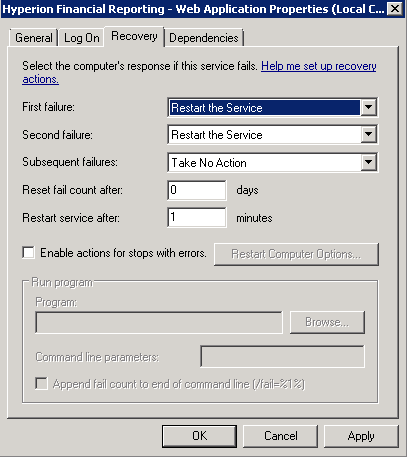
The settings are located in Windows Services, under the service properties there is a Recovery tab. Here you can set the action to "Restart the Service"


An easy way to script this is to get the Service names for all Hyperion components and write up something like this:
sc \\localhost failure HyS9FRReports actions= restart/60000/restart/60000/""/60000 reset= 0
Localhost can be replaced by the server name.

Some additional tips:
  • Don't infinity restart the service by setting the "subsequent failures" box. At some point you'll want to have it crash and stay down rather than flap up and down constantly.
  • This restart action is not intended to solve the root cause of problems. You should be detecting when the services crash to take additional action on the root cause.
  • This customization is overwritten whenever you run the Hyperion Config Tool. Config Tool resets the service properties and the custom settings would need reapplied. 

Wednesday, March 25, 2015

Useful Administrative Tools in Windows

Do you work with Hyperion in Windows and feel like your hands are tied? Like a fish out of water? OK, maybe this is an exaggeration for most admins, but as a former Linux sysadmin it is how I feel most days. I wanted to share some tools that can be used to help bridge the gap and become a Windows power user as it relates to Hyperion. Please feel free to share your own tools and ideas in the comments.

Note: Each of these tools has its own licencing agreement. Please carefully read and adhere to each licence. 

AstroGrep

Unix equivalent: grep
Find strings in files. AstroGrep is much more powerful than windows find utility. The Windows find utility only searches for whole words. For example, "this is an exception" vs. "java.lang.exception". The Windows find utility only finds the first example, yet AstroGrep finds both strings.

If Hyperion throws a weird message or error, you can use AstroGrep to search the file system for the file to help pinpoint where it is coming from and get more context around the error. It can be useful to find specific server names, passwords, usernames, etc in files such as MAXL scripts.

In the example below I am searching the *.log files in the EPM Diagnostics folder for the string "Exception".

WinDiff

Unix equivalent: diff

Diff files, or recursively entire directories for changes. For instance, compare the EPMA accounts from an LCM export taken at two different times to identify the differences in EPMA metadata.

mTAIL

Unix equivalent: tail -f
Windows error log tailer. It is used to monitor logs in real time. Simply drag and drop a file from windows explorer into mTAIL, click the start button and it will start displaying updates to the log file in real time. This is handy when you need to check a file over and over for updates, such as looking for new errors. It is also useful if you are constantly restarting WebLogic to check log for errors during startup.


Process Explorer and Handle

Unix equivalent: lsof
Ever try to rename or delete that certain folder and it keeps saying it is in use, but you do not see anything open? Ever have trouble with Hyperion patches failing to apply because some files in use? Obviously, the first step is to search task manager for Hyperion related processes. However, there are some pesky situations where this alone cannot identify the culprit. Process Explorer has an option to search file handles, and is easier to use. The Handle tool is a command line tool and kind of archaic, but can also find what is using the files you want to get access to.

WinDirStat

Unix equivalent: du -k | sort -n
Out of disk space? Need a quick tool to discover the where the most space is being consumed? WinDirStat gives you an ordered list of disk space consumption and lets you drill through, finding what is using all the disk space on your system.


mRemoteNG

  Sadly, the opensource form of this tool is deprecated. It it a very useful remote desktop/SSH session manager for Windows. Integrates nicely with PuTTY.

Process Monitor

Unix equivalent: strace
A very low level tool to see the system calls a process is making while executing. Typically this tool comes out when all of the normal avenues have been tried to solve the problem. Sometimes getting down to the level of system calls can pinpoint things like missing files, bad security, and bugs. This helps figure out why a process is crashing by seeing what unexpected conditions the process encountered while running.

Internet Explorer Developer tools

Similar tools also available in Chrome and Firefox

Network profiling can help find latency in your requests. For instance, you can measure the time it takes to get resources from different geographic regions and pinpoint certain latency issues. From the example below, there are a ton of images and background activity after each click in Hyperion. Sometimes slow performance can be found on the front-end using this method. It is also useful to inspect in detail certain processes for debugging purposes.

Simply go to Tools -> F12 Developer Tools. Select the Network tab, and "start capturing".


Wednesday, December 17, 2014

How to Triage Hyperion Errors in Windows


Ever get stuck with a intermittent application error requiring frequent interaction to help bounce the service if it gets stuck? Sometimes it is necessary to quickly detect an error and act on it immediately. For instance, if a production service such as DRM is crashing intermittently - but the service remains running - how can you effectively triage the issue? Another use case is with development activities. Sometimes during development the environment is somewhat unstable as new features come online - If you are not around to bounce the service do development activities come to a halt?

One option is to identify a specific Windows Event that denotes the error and attach a restart script to have windows automatically restart the service.

Keep in mind I am not recommending that simply bouncing the service it is going to solve the root problem. However, this trick can really cut down on downtime if an issue is present and help you focus on the root cause rather than babysit the symptoms.

For instance,
Let's say that an intermittent error occurs in DRM which comes out in the Event Log:

If you right click on the event there is an option "Attach task to this event...."

When you select this you are essentially provided the screens to create a Windows scheduled task such as in Task Manager.

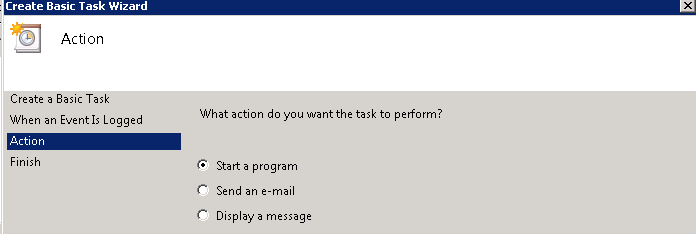
At this point, you can quickly configure sending an email to be notified of the event. My favorite option is to run a script by selecting "Start a program":

You can setup a quick script to bounce the service and point to the script.

set LOG=c:\drmrestart.log
net stop "Oracle DRM Server Processes"
net start "Oracle DRM Server Processes"
date /t >> %LOG%
time /t >> %LOG%
When finished, be sure to go into advanced properties:
  1) set the user to "system"
  2) make sure the script runs with highest privileges


That's all there is to it! At this point there is no need to babysit the service - it will detect the error condition automatically and bounce itself. Now you can get on to more important things such as finding that root cause.

Sunday, August 3, 2014

Windows WebLogic Servies Fail to Start - Trouble Encrypting boot.properties

I have run across this error a few times and have finally gotten around to documenting it. The issue occurs typically after a multi node Hyperion installation and all the WebLogic managed servers not residing on the WebLogic domain fail to start up. Essentially, you start the WebLogic service, and after a minute it shuts down. Looking into the WebLogic managed server log files: 


java.lang.AssertionError: java.lang.reflect.InvocationTargetException
at weblogic.descriptor.DescriptorManager$SecurityServiceImpl$SecurityProxy._invokeServiceMethod(DescriptorManager.java:175)
at weblogic.descriptor.DescriptorManager$SecurityServiceImpl$SecurityProxy.decrypt(DescriptorManager.java:192)
at weblogic.descriptor.DescriptorManager$SecurityServiceImpl.decrypt(DescriptorManager.java:114)
at weblogic.descriptor.internal.AbstractDescriptorBean._decrypt(AbstractDescriptorBean.java:1092)
at weblogic.management.configuration.SecurityConfigurationMBeanImpl.getCredential(SecurityConfigurationMBeanImpl.java:737)
at weblogic.security.internal.ServerPrincipalValidatorImpl.getSecret(ServerPrincipalValidatorImpl.java:88)
at weblogic.security.internal.ServerPrincipalValidatorImpl.sign(ServerPrincipalValidatorImpl.java:67)
at weblogic.security.service.PrivilegedActions$SignPrincipalAction.run(PrivilegedActions.java:62)
at weblogic.security.service.SecurityServiceManager.createServerID(SecurityServiceManager.java:1098)
at weblogic.security.service.SecurityServiceManager.getServerID(SecurityServiceManager.java:1109)
at weblogic.security.service.SecurityServiceManager.sendASToWire(SecurityServiceManager.java:600)
at weblogic.server.channels.ChannelService.resetQOS(ChannelService.java:296)
at weblogic.server.channels.ChannelService.start(ChannelService.java:258)
at weblogic.t3.srvr.SubsystemRequest.run(SubsystemRequest.java:64)
at weblogic.work.ExecuteThread.execute(ExecuteThread.java:256)
at weblogic.work.ExecuteThread.run(ExecuteThread.java:221)

Caused By: weblogic.security.internal.encryption.EncryptionServiceException
at weblogic.security.internal.encryption.JSafeEncryptionServiceImpl.decryptBytes(JSafeEncryptionServiceImpl.java:139)
at weblogic.security.internal.encryption.JSafeEncryptionServiceImpl.decryptString(JSafeEncryptionServiceImpl.java:187)
at weblogic.security.internal.encryption.ClearOrEncryptedService.decrypt(ClearOrEncryptedService.java:96)
at sun.reflect.NativeMethodAccessorImpl.invoke0(Native Method)
at sun.reflect.NativeMethodAccessorImpl.invoke(NativeMethodAccessorImpl.java:39)
at sun.reflect.DelegatingMethodAccessorImpl.invoke(DelegatingMethodAccessorImpl.java:25)
at java.lang.reflect.Method.invoke(Method.java:597)
at weblogic.descriptor.DescriptorManager$SecurityServiceImpl$SecurityProxy._invokeServiceMethod(DescriptorManager.java:173)
at weblogic.descriptor.DescriptorManager$SecurityServiceImpl$SecurityProxy.decrypt(DescriptorManager.java:192)
at weblogic.descriptor.DescriptorManager$SecurityServiceImpl.decrypt(DescriptorManager.java:114)
at weblogic.descriptor.internal.AbstractDescriptorBean._decrypt(AbstractDescriptorBean.java:1092)
at weblogic.management.configuration.SecurityConfigurationMBeanImpl.getCredential(SecurityConfigurationMBeanImpl.java:737)
at weblogic.security.internal.ServerPrincipalValidatorImpl.getSecret(ServerPrincipalValidatorImpl.java:88)
at weblogic.security.internal.ServerPrincipalValidatorImpl.sign(ServerPrincipalValidatorImpl.java:67)
at weblogic.security.service.PrivilegedActions$SignPrincipalAction.run(PrivilegedActions.java:63)
at weblogic.security.service.SecurityServiceManager.createServerID(SecurityServiceManager.java:1098)
at weblogic.security.service.SecurityServiceManager.getServerID(SecurityServiceManager.java:1109)
at weblogic.security.service.SecurityServiceManager.sendASToWire(SecurityServiceManager.java:600)
at weblogic.server.channels.ChannelService.resetQOS(ChannelService.java:296)
at weblogic.server.channels.ChannelService.start(ChannelService.java:258)
at weblogic.t3.srvr.SubsystemRequest.run(SubsystemRequest.java:64)
at weblogic.work.ExecuteThread.execute(ExecuteThread.java:256)
at weblogic.work.ExecuteThread.run(ExecuteThread.java:221)


WebLogic is trying to read the boot.properties file in order to get the credentials to startup the managed server. However, it appears it needs to contact the WebLogic Domain in order to properly encrypt the boot.properties. You would also see the failed connection to the WebLogic Domain in the logs:

<Aug 2, 2014 6:52:04 AM UTC> <Emergency> <Management> <BEA-141151> <The admin server could not be reached at http://wldomain:7001.>
<Aug 2, 2014 6:52:04 AM UTC> <Info> <Configuration Management> <BEA-150018> <This server is being started in managed server independence mode in the absence of the admin server.>

Having a look at the boot.properties file it looks like the password has not been encrypted, hence the EncryptionServiceException. It is trying to read what it thinks is the encrypted password but the password is plain text, causing the exception. 

C:\Oracle\Middleware\user_projects\domains\EPMSystem\servers\RaFramework0\security\boot.properties
#
#Fri Aug 01 05:06:31 UTC 2014
password=epm_admin
username=mypassword


So the question is how to get the Managed Server to properly contact the WebLogic domain to encrypt the boot.properties file. 

I usually do this by starting it from the command line, 

cd C:\Oracle\Middleware\user_projects\domains\EPMSystem\bin
startManagedWeblogic.cmd RaFramework1 http://wldomain:7001

Note, the second argument is the WebLogic Domain URL. 

While starting up, assuming the Managed Server is able to connect to the domain you will see:

<Aug 2, 2014 6:57:37 AM UTC> <Notice> <Security> <BEA-090083> <Storing boot identity in the file: C:\Oracle\Middleware\user_projects\domains\EPMSystem\servers\RaFramework1\security\boot.properties>

This is a good indication that the problem has been resolved. Looking in the boot.properties you should see the encrypted password.

This approach is what I find best for debugging. Additionally, the startup parameters for starting the WebLogic managed server as a Windows service are in the Windows Registry. Specifically for Hyperion there is a JVMOption for setting the WL Domain server. Make sure that this is set correctly when starting as a Windows service. "-Dweblogic.management.server=http://wldomain:7001"